Playing online
How fast the network and internet connection must be in order to play "comfortably".
To play games, of course, we need a computer with a sufficiently powerful processor, a graphics card, with enough working memory, enough disk space... But if we want to play multiplayer games over the Internet, this is not enough. A fast enough connection to the Internet and a fast enough connection to the game server are also required. And this applies not only to computers, but also to consoles. So what should the connection be? How do I measure it? The tool is just that something.
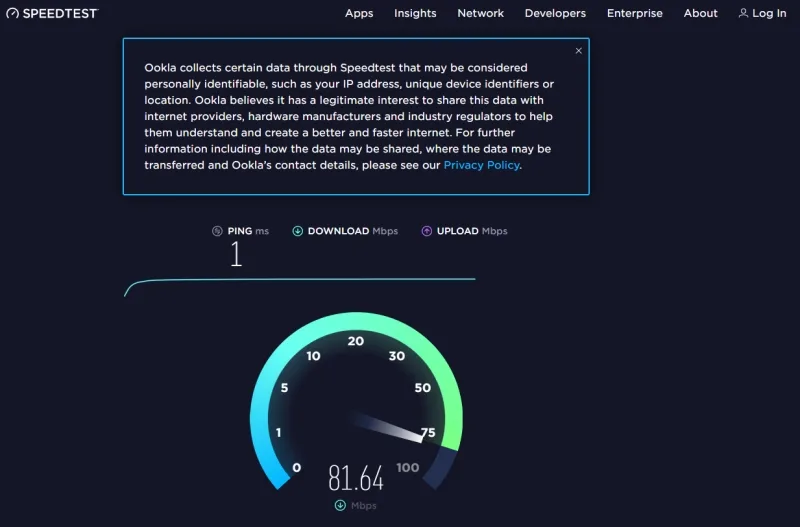
Internet access speed. Games are quite greedy when it comes to internet bandwidth. The unwritten rule is that you need to have at least 30 Mb/s available in the direction towards you (download), but if someone else is using the connection at the same time as you, for example a sister who chats on a video conference connection or a brother who is watching a movie on Netflix, then of course this speed must be higher. 100 Mb/s is not bad suggestion…
Ping. Ping is one of the best methods for determining the quality of a link to a specific website. What good is a fast internet connection if you access the game server slowly through it. Ping is a function or a command that sends a packet of data to the desired website and waits for it to "bounce" from it or get a response. The shorter the time, the better, of course. And what is good? It roughly applies as follows:
- Ping, shorter than 20 ms – an excellent connection, where even the most demanding games will be nicely responsive,
- 20 to 50ms – good connection, most games will run without lags in reactions,
- 50 to 100ms - an average connection where there will be a lag here and there that your opponent can use against you,
- 100 to 300 ms – a bad connection, where you will be able to play the game, but there will be delays and thus nervousness and nervousness, quite a lot,
- Above 300ms – playing a game with such delayed access makes no sense. If you get a ping of this value, then try to find a better server. Many games offer different options.
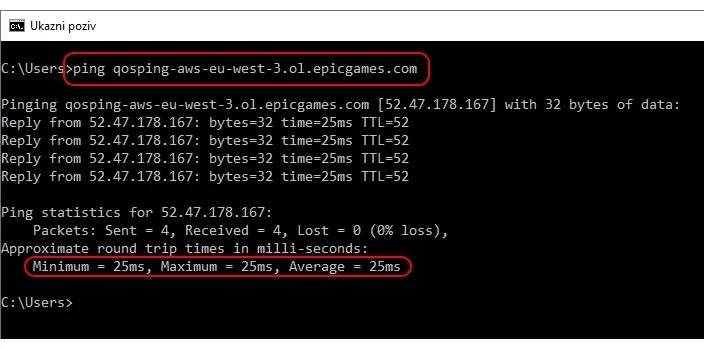
And how to measure ping? One option is through the command prompt (CMD), where you enter the command "Ping server name" (without quotes). "Pinging" the European Fortnite game server would look like this:
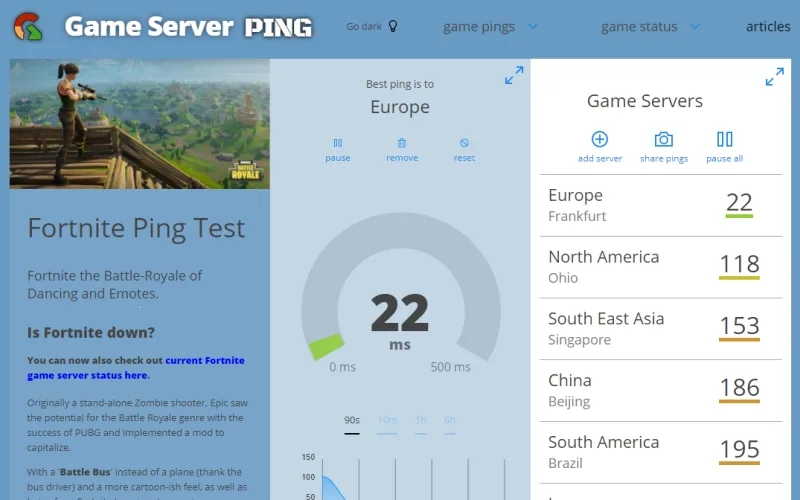
The problem with the method is that it is necessary to know the address of the servers, which is not always the easiest to find. More useful is, for example, the website Game Server Ping, where the servers of all of possible games, presented in a transparent and friendly way, as you can see in the cover image.
If your internet connection is fast enough, the ping is low enough, then you are basically on the horse. However, if "coughing" still occurs, here are a few more tips:
- If possible, use a wired connection to play instead of wireless (WiFi),
- If the wireless connection is weak, try moving the router. If it has two antennas, sometimes it works if you turn one horizontally and the other vertically,
- Use tools like WiFi Analyzer to check your wireless connection and possibly change the communication channel. If your router supports the 2.4 and 5 GHz band, choose the latter, as it offers more channels that do not overlap with each other,
- Activate QoS (quality of service) in the router and set it so that it will focus the most "attention" on gaming. How to do this, check the instructions of the router.
- Change the name server in the router. Sometimes the name server (DNS) is to blame for problems. In the router settings (instructions), try something else, say Google's (8.8.8.8 or 8.8.8.4), Quad's (9.9.9.9 or 149.112.112.112), Cloudflare's (1.1.1.1 or 1.0.0.1), OpenDNS Home (208.67.222.222 or 208.67.220.220) and some others can be found.
If your wireless connection is still struggling, you'll need to consider a better router or something to do with your signal coverage. ▪
AI translated